Showing posts with label eset. Show all posts

Friday, September 28, 2012

Mobile adware on the rise

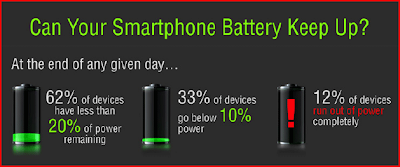
    As many of you may know, there are many apps that are not entirely beneficial, most being for andriod phones. Now that so many people have a smart phone, malware creators are starting to focus more and more on making malicious apps. These can not only steal your personall data, or harass you and your friends with spam and ads, it also drains your battery. A recent survey has shown that about 12% of phones run out of battery completely each day. This can be very annoying, and with 60% of people saying that battery life is the main selling point, very costly.
A trend micro study on battery usage


    Adware is now incorporated into many apps, and while most ads are displayed legitimatly, they can now create illigitimate "notifications" or icons, that, when clicked, lead to the advertisers website. Many of these ads also steal your personall info, most of them without any sort of notification that they are doing this. They collect and send data in the background, and burn through your battery life and data usage.

    There are many free antivirus apps that can protect agains most common threats, and also many paid apps. I personally recommend either Sophos mobile security, or ESET's mobile app. They can be found here and here, respectively (Sophos being free, ESET a paid app).

Credits:
Trend Micro


Sunday, September 23, 2012

ZeroAccess: How to remove the latest version

   In my previous 2 posts I have highlighted the changes in the newer version of ZeroAccess and how to tell if you are infected, and who is at most risk. This post will cover how to get rid of this infection, and what tools to use to protect against it.

    The easiest way is to download one of many anti-virus programs, or removal tools. I always recommend ESET as they have always gotten the job done for me and my family. ESET has made a tool specifically to remove the ZeroAccess bot, one that is easy and completely free.

  1. Download the tool here
  2. Start the tool by double clicking it.
  3. Press "Y" when it asks you if you want to restore system services
  4. Once the tool has finished working, restart your computer by pressing any key.
  5. You may be prompted with a security window upon restarting, click yes or allow
  6. Click "Yes" on the repair window
  7. Once the repair is finished, you will be prompted to restart again, do so.
  8. For best results and to ensure complete removal, purchase ESET Smart Security or ESET Nod32 and run a full scan.
    As you can see, it is fairly simple to remove this virus, if you have any trouble, comments, or questions, let me know in the comments section (Don't be embarrassed, I have to approve comments, if you think it is a stupid question, just ask that I do not post the comment, and I will contact you directly.)

    The main way this bot spreads is through exploits, most of which are patched in the latest versions of the software they are designed to exploit, so make sure you apply regular updates, and don't visit shady sites. Also, I know it may be hard to refrain from pirating things like games, so I encourage you to only download "cracks" if there have been many downloads, even then, make sure to read the comments and do not download if it is reported to be infected, or not working correctly. Also remember that I do not condone pirating or any form of illegal downloads.


Saturday, September 22, 2012

ZeroAccess: 9 million infected, are you one of them?

    As I mentioned in my previous post, ZeroAccess is still around and is adapting. Over 9 million PCs are now infected with this bot. Most are located in the USA or Western Europe. 33% of super nodes are located in Germany, with the US coming in a close second with 32%. A super node is an infected machine that is not behind a system like NAT so that other bots, or peers, can access it. This post will be mainly directed at how to tell if you are infected, and who is at the most risk of infection.

    ZeroAccess uses multiple install locations, so you should check all of them. The main component drops at two locations, 1 in appdata, the other in windows/installer. if one is deleted, the other is still perfectly capable of functioning. The two locations are shown in figure 1.1.
Figure 1.1
Thanks to SophosLabs
 Both contain a dll file, named "n" (the main component), which are added to startup by hijacking a COM directive. These also contain a file named "@" which is a list of predetermined peers for the bot to connect to and retrieve updates, commands, etc. These folders also have 2 directories named "U" and "L" which contain plugins and temp files.


Also, if you have windows vista or up, ZeroAccess will try to patch services.exe fortunately, it is easy to restore by running the following command:
sfc.exe /scanfile=c:\windows\system32\services.exe
Simply check for these signs to see if you are infected. If you have been browsing the web without appying recent updates to internet explorer, adobe flash, or java, scan and fix, and apply all updates.
My next post will explain in detail how to remove and protect from this virus.

Credits:
SophosLabs


Monday, September 10, 2012

PlugX or Korplug

     Some of you may have heard about a campaign using Poison Ivy to target users in Japan, China, and Taiwan. The same group is now developing a new RAT (Remote Administration Tool) called PlugX or Korplug. They seem to be distributing both side by side and are using some of the same servers to control both. This Trojan is detected as "Backdoor.Win32.Plugx". The Trojan is being deployed in attachments to spam mail (examples provided here). Some variants of this virus may be signed with stolen certificates.

    How to remove:
    Most Antivirus programs (such as Norton and Nod32) detect and remove this Trojan, so running a scan with any of these should get rid of the problem. However, it is possible to manually remove this trojan by following these steps (provided by 2-spyware)


  1. Delete registry values: 
    1. HKEY_LOCAL_MACHINE\SOFTWARE\Classes\FAST
    2. HKEY_LOCAL_MACHINE\SYSTEM\CurrentControlSet\Enum\Root\LEGACY_SXS
    3. HKEY_LOCAL_MACHINE\SYSTEM\CurrentControlSet\Services\SxS
  2. Delete files: 
    1. %UserProfile%\SxS\bug.log 
    2. %UserProfile%\SxS\rc.exe 
    3. %UserProfile%\SxS\rc.hlp 
    4. %UserProfile%\SxS\rcdll.dll

Sorry for this short post, more information on this threat will be posted later. Be sure to check the sources for more information and continued reading.


Remember to comment with a topic for my next post.


Sources:
TrendMicro
Symantec