Showing posts with label browser. Show all posts

Saturday, September 22, 2012

ZeroAccess: 9 million infected, are you one of them?

    As I mentioned in my previous post, ZeroAccess is still around and is adapting. Over 9 million PCs are now infected with this bot. Most are located in the USA or Western Europe. 33% of super nodes are located in Germany, with the US coming in a close second with 32%. A super node is an infected machine that is not behind a system like NAT so that other bots, or peers, can access it. This post will be mainly directed at how to tell if you are infected, and who is at the most risk of infection.

    ZeroAccess uses multiple install locations, so you should check all of them. The main component drops at two locations, 1 in appdata, the other in windows/installer. if one is deleted, the other is still perfectly capable of functioning. The two locations are shown in figure 1.1.
Figure 1.1
Thanks to SophosLabs
 Both contain a dll file, named "n" (the main component), which are added to startup by hijacking a COM directive. These also contain a file named "@" which is a list of predetermined peers for the bot to connect to and retrieve updates, commands, etc. These folders also have 2 directories named "U" and "L" which contain plugins and temp files.


Also, if you have windows vista or up, ZeroAccess will try to patch services.exe fortunately, it is easy to restore by running the following command:
sfc.exe /scanfile=c:\windows\system32\services.exe
Simply check for these signs to see if you are infected. If you have been browsing the web without appying recent updates to internet explorer, adobe flash, or java, scan and fix, and apply all updates.
My next post will explain in detail how to remove and protect from this virus.

Credits:
SophosLabs


Monday, May 21, 2012

Adware is making a comback

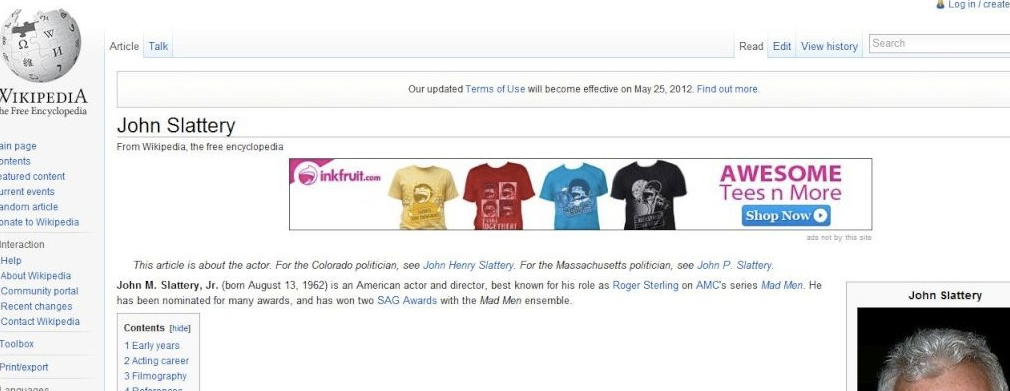
Browser extensions are now being used by adware developers to inject ads into websites. Many Wikipedia users have been complaining of ads being displayed on its site, while Wikimedia has stated that they will not put up adds. Wikimedia is a non-profit and will never display ads on their site, so if you see them, you most likely have a bad browser extension.
Not only do these adware extensions cause annoying ads, some of them are even used for more sinister purposes. One extension mentioned by wikimedai called "IWantThis!" is spyware that is masquerading as adware. In its privacy policy it states:
Examples of the information we may collect and analyze when you use our website include the IP address used to connect your computer to the Internet; login; e-mail address; password; computer and connection information such as browser type, version, and time zone setting, browser plug-in types and versions, operating system, and platform; the full Uniform Resource Locator (URL) clickstream to, through, and from the Site, including date and time; cookie; web pages you viewed or searched for; and the phone number you used to call us.
Some of these extension may come bundled with freeware downloaded from other sites, and be installed involuntarily. Many of these extensions target Chrome as the go to browser, but are very capable of being installed on other browsers as well. Few antivirus software will actually scan or detect faulty or malicious browser extensions so it is up to you to keep yourself secure. Never install toolbars or extensions that promise "free cursors", "free games", etc. Regularly check through your extension/toolbars/addons and disable/remove those that you are not using or did not install. And, as always, do not download or install anything fishy.

Remember to post in the comments what you would like to see next.